Bulldog Bucks provide a flexible and convenient way to spend money both on and off campus. Simply load funds onto your Drake Card and scan like you would a debit or credit card instead of using cash. Bulldog Bucks roll over from semester to semester as long as you are actively using your account (accounts will be cleared after a full year of inactivity).
What can Bulldog Bucks be used for?
- Food at Drake dining facilities, including concession stands and the C-store
- Printing costs
- Bulldog Shop purchases
- Select Drake Neighborhood businesses - click here to see who is participating.
- GrubHub payment method - even if you don't use your Bulldog Bucks to pay, feel free to add your card as an option - this will give you access to GrubHub +, which offers free delivery and other perks!
Feel free to contact studentservices@drake.edu if you have questions about this program.
Troubleshooting Tips
- If your card did not work at a participating business, please make sure that you have BULLDOG BUCKS loaded to your card, not Dining Dollars. Only the Bulldog Bucks account can be used off-campus, Dining Dollars are for on-campus purchases only.
- If your card did not work at a participating business, please make sure that you have enough in your account to cover the full purchase. If there are not sufficient funds, it will deny the transaction, even if you have a small balance in your account.
- If you would like to use Bulldog Bucks on a partial purchase, you can ask the merchant to type in your balance into their card reader, and then pay the remaining balance due with another payment method. Please note that the merchant does not have the ability to check your balance, so you will be responsible for letting them know what amount to type in.
- To add your Campus Card for use (and special offers) in the Grubhub app, go to Account, then Campus Dining. Select our campus, and follow the steps to verify you are a Drake cardholder. This will allow you to use your Bulldog Bucks as a payment method, will give you access to Grubhub+ perks, and will give you access to special campus promos!
How to add funds
Funds can be added during business hours in the Student Services Center (credit or debit preferred, check and cash also accepted). Cardholders and guests can also add funds online in our eAccounts portal. Mastercard, Visa, and Discover cards only - American Express cards are not accepted at this time.
A free mobile app is also available to add funds if you've saved a payment method in the main site. You can download the Blackboard eAccounts application for either Apple or Android phones.


Use the app to make deposits to your Bulldog Bucks account, check your remaining balances, recent transactions, view monthly statements, or mark a misplaced card as "lost".
For detailed instructions on how to navigate the eAccounts portal, use any of the tutorials below!
For Guests, Parents, or Families
For Students, Faculty, or Staff
- How to deposit to your Bulldog Bucks account (on a computer)
- How to deposit to your Bulldog Bucks account (on mobile app)
- How to report a lost card (on computer)
- How to report a lost card (on mobile app)
- How to check your account balance (on computer)
- How to check your account balance (on mobile app)
- How to view your account statement
- How to view your recent transactions
Printing Policy
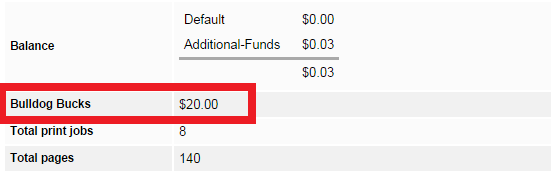
The University adds $20.00 of Bulldog Bucks for all full-time students to use during the Fall and Spring semesters, and $2.00 to use if enrolled in a J-term or Summer course. These funds will be loaded into your account by noon on the first day of your semester. Print funds can only be used for printing, they cannot be used for food, and they will not carry forward to future semesters. Print money for professional programs (Law and Pharmacy) will load at the start of their fall and spring semesters, which may not align with undergraduate timelines.
Bulldog Bucks can be used for printing, but for printing costs, technical printing support or information about the PaperCut system, contact Information Technology Services.
If you are a full-time student that did not receive the printing allocation on your Bulldog Bucks submit a ticket to let us know.
See below for an update on what your Printing balance may look like in the Papercut application. The $20 balance currently labeled "Bulldog Bucks" is the amount loaded from the university for full-time students.